
O-11-106 Assigning Field Staff Productivity
👤 RESPONSIBLE POSITION | ROLE
Clinical Supervisor
🎯 PURPOSE
Upon hire, every licensed salaried field staff member will be assigned a productivity expectation in Home Care Home Base, 30 pts for 1.0 status and 24 pts for .8 status. This productivity expectation reflects the visits that can be effectively completed within a 40 hr work week for a worker with a 1.0 status or 32 hr work week for a .8 status.
This productivity expectation is to be reviewed and potentially adjusted to increase or decrease every eight weeks collaboratively with the field staff member, the Clinical Supervisor and the Area Manager. Productivity expectations are adjusted based on a number of factors, including but not limited to number of clients on caseload, acuity of clients on caseload, drive time in between clients on case load, location of caseload and history of visits that can be effectively completed within that workers 40 hour or 32 hour work week. This process gives overall direction on the steps to take to set the productivity expectation in Home Care Home Base.
🔄 PROCESS
-
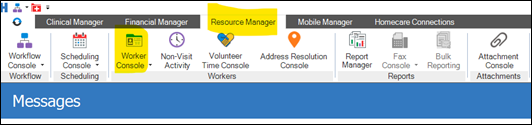
Navigate to the Resource Manager tab in HCHB and open the Worker Console:
-
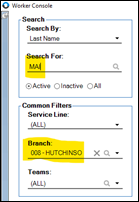
Search for the worker by typing at least three letters of their last name and selecting the branch they are assigned to:
-
Select the worker’s name to open the worker profile:

-
Navigate to the Payroll Information tab as shown below.

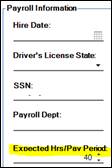
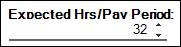
- Under Payroll Information, ensure Expected Hrs/Pay Period is filled in based on the status of the licensed salaried field staff member.
-
Example: if their status is a 1.0, enter 40
-
Example: if their status is a 0.8, enter 32
-
NOTE: This is essential for the accurate calculation of productivity points/PTO Day.
-
Double-click on the current line of Effective Dated Payroll Information as shown below to expand basic information for the worker:

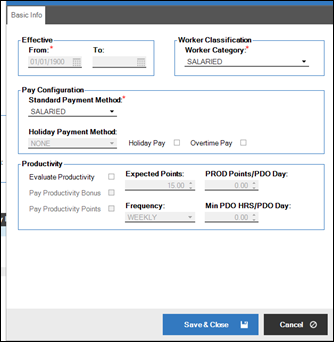
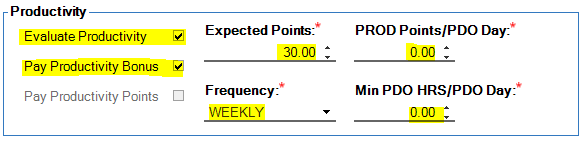
- Set up the “Productivity” section of the basic info as follows:
- Check Evaluate Productivity
- Check Pay Productivity Bonus
- Ensure the “Expected Points” is initially set for the worker as stated above, 30 pts for 1.0 status and 24 pts for .8 status
- Ensure “PROD Points/PDO Day” is left at system default of 0.00
- Ensure “Frequency” is set to weekly
-
Ensure Min PDO HRS/PDO Day is left at system default of 0.00
-
Select Save & Close:

- The Clinical Manager, Area Manager and field staff member must collaboratively review and potentially adjust to increase or decrease the expected points every eight weeks.
- The following processes should be referenced to identify the reports that show clinician behavior within HCHB:
📅 Effective: 08.06.2026 | 🛠️ Revised: N/A | ✅ Approved: JS, AM