
O-11-801 Worker Productivity Report
👤 RESPONSIBLE POSITION | ROLE
Clinical Supervisor
📅 FREQUENCY
Weekly on Mondays
🎯 PURPOSE
The Worker Productivity Report displays clinician productivity information. This report can be used to evaluate productivity points earned by a clinician for a specified date range. It includes visit activity and non-visit activity, and displays the difference between clinician expected points and total points earned.
The Clinical Supervisor will run this report to determine if clinician is at, above, or below productivity.
Per-Visit and LPN/COTA/PTA Staff: Even though these worker types are not part of the productivity program, Clinical Supervisors can run this report to easily identify how they are being utilized in comparison with Case Managers and other workers.
🔄 PROCESS
-
Go to Report Manager.

-
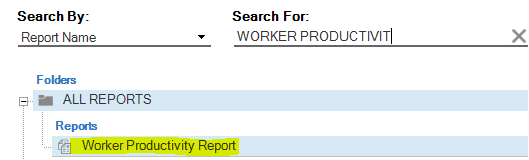
Search for and select Worker Productivity Report.
- Select the appropriate filters:
- Dates From/To: Previous week ending Saturday
- Branch Group: Ensure “Client Branches” is left as “ALL” if you have workers filling in for another branch.
-
- Worker Team
- Worker: Select a specific worker only if you are running it for a specific employee
-
Worker Categories: Select Per Visit and Salaried

Evaluate Productivity: Leave at ALL

- Per-Visit and LPN/COTA/PTA Staff: Even though these worker types are not part of the productivity program, Clinical Supervisors can run this report to easily identify how they are being utilized in comparison with Case Managers and other workers.
- Display Report Criteria: No
-
Select View/Print.

- Review the report.
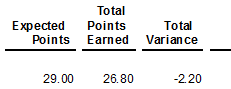
- Expected Points: Points defined in the worker profile
- Total Points Earned: Total points calculated at the time the report was ran
-
Total Variance: The difference between expected and total.
-
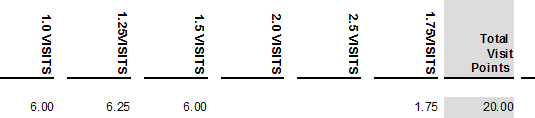
Visit Columns: Shows how many points associated to visits with specific productivity threshold. Amount totaled in the last column to reflect number of productivity points associated to visits:
-
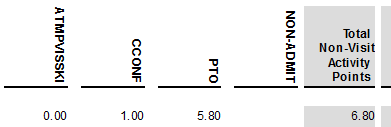
NVA Columns: Shows how many points are associated to specific NVAs. Totaled to reflect amount of productivity points associated to Non-Visit Activity.
-
Select the + icon to view the specific employee productivity breakdown:

-
Attempted Visits: No points associated, but helps explain clinician’s week

-
Paid Time Off/Holiday: Should reflect correct amount per employee. Calculated based off of productivity points and expected hours worked. This should not be 0. If it is, then the worker profile is likely not set up correctly.

-
Unfilled SOC/Eval Availability: Entered by the supervisor to account for SOC/Eval availability unable to be filled by new referrals.

-
Non-Admits: Should be reflected by the NVA entered by the supervisor:

NOTE
If a non-admitted client shows up as a SOC with productivity points, the Non-Admit has been processed in error and must be corrected.



📅 Effective: 08.05.2026 | 🛠️ Revised: N/A | ✅ Approved: JS, AM