
O-11-803 Agent Visit Time Report
👤 RESPONSIBLE POSITION | ROLE
Clinical Supervisor
📅 FREQUENCY
As Needed
🎯 PURPOSE
The Agent Visit Time Report displays a detailed summary of worker visit time including in home time, documentation time, and the total time used to complete the visit. This report is ran as needed to identify if there are any workers having difficulties completing documentation in the home. It can also identify trends of in-home time as it can be sorted by visit note type.
Clinical Supervisors should run this report if concerned with clinician time management, untimely visit completion, or excessive documentation time/documentation time outside of the visit.
🔄 PROCESS
-
Go to Report Manager:

-
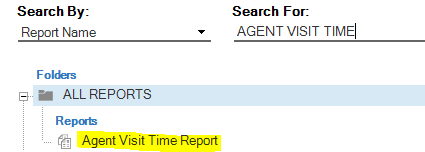
Search for and select Agent Visit Time Report:
- Select the appropriate filters:
- Dates From/To: Select previous week or longer
- Branch Groups/Branches
- Ensure “Client Branches” is left at “all” if you are running it for a specific worker, and that worker is assisting another branch.
- Worker Team: Select team only if wanting to review trends for the whole team at the same time.
- Worker: Select specific worker to run for a specific employee
- Display Report Criteria: No
-
Select View/Print:


-
Review the report. Report is broken down by Visit Type, then summarized at the end.

- In Home: In-Home Visit Time
- Add’l Doc: Documentation time outside of the visit
- Total: In home time plus documentation time
- Drive: Travel time associated to the visit
- Doc. Completion Time: Date/Time the document was completed
- Sync Time: Date/Time the visit was synced to the back office
- Hrs Doc Comp. to Sync: Time between the completion of the document and the sync to the back office
- In Home End Time: Date/Time the visit ended
- Hrs in Home End to Sync: Time between the end of the visit and the sync to the back office
-
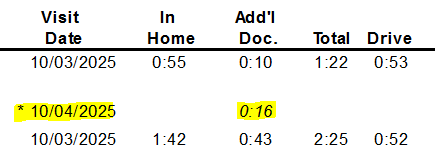
* Date: indicates visit documentation performed on a different date than the visit:
-
Each section is summarized; then there is a summary at the end of all visit types:

📅 Effective: 01.08.2026 | 🛠️ Revised: 08.06.2026 | ✅ Approved: JS