
O-11-802 Agent Summary Report
👤 RESPONSIBLE POSITION | ROLE
Clinical Supervisor
📅 FREQUENCY
Daily
🎯 PURPOSE
The Agent Summary Report shows the status of visits that have been assigned to workers, but have not been completed and synced back to the office.
🔄 PROCESS
-
Go to Report Manager:


2. Search for and select Agent Summary Report:

-
Select the appropriate filters:
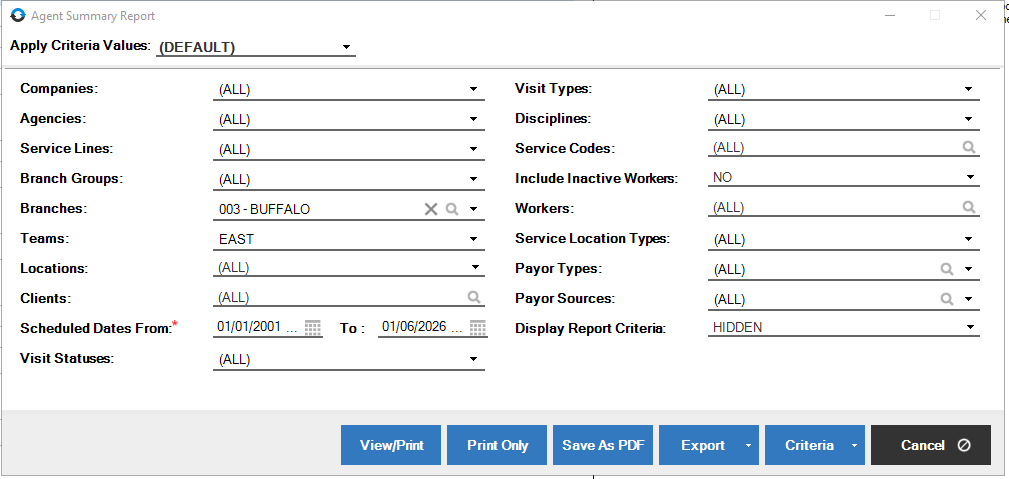
- Branch
- Team
- Scheduled Dates From: 01/01/01
- Scheduled Dates To: Yesterday
- Note: if you include Today, it will also pull accepted visits for the date
- Display Report Criteria: Hidden
-
Select View/Print:

-
Review report for the following visit statuses:

- Almost Complete: Visit has been synced back from the field and the system is processing all the information. Notify clinicalsupport@adarahomehealth.com to resolve.
- Pending: Visit has been scheduled, but the clinician has not synced to pull up the visit on the device.
- Accepted: Visit is accepted on the clinician’s device.
- Late: Visit was not synced back to the office before midnight on the date it was scheduled. This visit may need to be rescheduled. Contact the clinician for follow up.
- Checked Out: Visit is on the clinician’s device, but the clinician has not addressed the visit yet. Clinician still needs to accept, reschedule, decline, etc.
- Paused: Clinician started but then paused the visit. The only time a visit should be paused is if directed by process/supervisor and the clinician is still at the client’s home.
- Incomplete: Visit has been performed, but clinician has not finished documenting on the visit.
📅 Effective: 01.08.2026 | 🛠️ Revised: 08.06.2026 | ✅ Approved: JS