
O-9-301 Escalation of Inbound Faxes
🎯 PURPOSE
Outlines the steps required to escalate inbound faxes for existing clients to Clinical Supervisor and Case Manager prior to attachment to HCHB.
🔄 PROCESS
-
Go to Inbox, select View:

-
Select eye icon to view fax in inbox:

- If any document edits are needed, such as separation of multiple clients, refer to O-9-214 Editing Documents in Mosai.
-
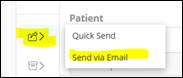
Select Send and Transfer icon, then select Send via Email:
-
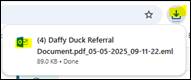
Email draft will open in downloads folder. Click to open:
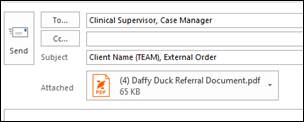
- Complete To and Subject line of email.
- Send to Clinical Supervisor and Case Manager.
-
Subject: Client Name, TEAM, and what the fax is (ie, lab results, external order, progress note, etc)
- Send the email.
- Return to Mosai and attach document to HCHB.
- Refer to O-9-215 Create Case in Mosai and Attach to HCHB for detailed steps.


📅 Effective: 05.05.2025 | 🛠️ Revised: 10.21.2026 | ✅ Approved: JFJ