
O-11-205 Agency Readmit in HCHB
👤 RESPONSIBLE POSITION | ROLE
Intake Coordinator
Clinical Intake
🎯 PURPOSE
During the Intake process, if HCHB recognizes the same or similar client in the database, it will prompt the user to review potential matches for both active and discharged clients. Clients that are currently active should NOT have new referrals entered until their previous episode has been addressed. Previous clients that have been discharged should be readmitted to maintain client history within their medical record as they will share the same medical record number.
🔄 PROCESS
Users may be prompted to review potential matches during Review External Referral Request if the client was added in Mosai or during manual referral entry.
Refer to O-14-120 Review External Referral Request, O-11-206 Manually Create Referral in Back Office, and O-9-212 Create Client Shell in Forcura for additional details.
|
Table of Contents |
| Patient Lookup |
| Service Location/Address |
| Patient Contact Information |
| Emergency Contact Information |
| Referral Source |
| Attachments |
Patient Lookup
-
If referral is manually entered (using “New Referral”), user MUST select “tab” or the magnifying glass to trigger Patient Lookup:



-
Review the client list to determine if previous referral or active client. Scroll over to the Active and Status columns to determine if the client has an active episode and if discharged, whether the client is okay to readmit.
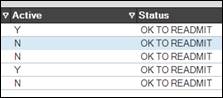
- If “Y” is in “Active” column, this means that client status is currently listed as “Active” in HCHB. Episode MUST be reviewed before client is re-entered into HCHB.
- Episode may be on HOLD status.
-
Episode may be discharged, but client status may have remained “Active” in error. Search for episode in Clinical Input:
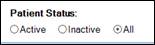
- Clients that are being seen for a Resumption of Care do NOT require a readmit.
- Refer to O-11-213 Agency Readmit due to Payer Change for clients that require a new Start of Care due to payer changes
- Clients with a status of Do Not Readmit must be addressed with Area Manager.
- If “Y” is in “Active” column, this means that client status is currently listed as “Active” in HCHB. Episode MUST be reviewed before client is re-entered into HCHB.
-
If client is not active (N) and status indicates OK TO READMIT, confirm DOB and demographic information is accurate.
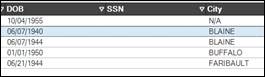
-
If accurate, click Select to readmit client:

NOTE
Key demographic information such as Date of Birth and Social Security Number should NOT be edited on a Re-Admit. Editing the client last name or first name is ONLY appropriate if a name change (i.e. Marriage, divorce, etc) is confirmed.
Service Location/Address
-
If client resides at the same Service Location, select location from list and click Select Patient Address:
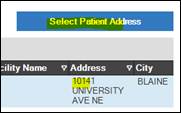
- If client has moved, select Add New Patient Address to create a new service location for the client:

Patient Contact Information
Review and update these fields. Information may populate from previous readmit.

Emergency Contact Information

- Re-Admits generated through External Referral workflow will not pull emergency contact information from a previous admission.
- If client is manually re-admitted, review information to verify contact information is accurate and still relevant.
-
Edit Contact: Select to edit contact information, type, description, etc.

-
Inactivate: Select if contact is no longer relevant or applicable .

-
Referral Source
The Referral Type will automatically default to READMISSION, but user must still select appropriate Referral Source for the readmit.

Attachments
Patient Attachments remain with the client over multiple episodes of care. As long as the Medical Record Number (MRN) remains the same, Patient Attachments will be viewable as the episodes are tied together.
Refer to O-11-206 Manually Create Referral in Back Office for additional steps to finish creating new client referral.
📅 Effective: 04.03.2025 | 🛠️ Revised: 10.19.2026 | ✅ Approved: JS