
O-11-213 Agency Re-Admit due to Payer Change
👤 RESPONSIBLE POSITION | ROLE
Intake Coordinator
Clinical Intake
Clinical Supervisor
Authorization Specialist
Clinical Compliance Specialist (CCS)
🎯 PURPOSE
This process defines agency re-admits due to changes in payer source. Payer changes may be planned or unexpected and typically require a DC(Discharge) and SOC (Start of Care) to be performed to maintain a client on service. This process outlines these unique circumstances and the action to take as clients that fall into these categories are not considered “New Referrals” as they are already actively admitted to the agency and are currently receiving services.
Agency Driven DC/SOC (Planned Payer Change)
Clinician determines client no longer meets criteria for current payer source and requires transition to new payor source. Clinical Supervisor is typically involved to communicate discharge plans from current payer and admission to new payer. Collaboration with Authorization Specialist and CCS should occur PRIOR to Agency DC to verify any necessary authorization or F2F requirements for new payer.
Example: Client currently open under Medicare for therapy. Goals will be met next week but client needing ongoing SNV for medication set up under VA.
Example: Client currently open under MA for med set up but had a fall with injury and now requires therapy services. Client is now homebound and meets Medicare criteria.
DC/SOC due to Payer Change Only (Unexpected Payer Change)
Unexpected payer changes often result in DC/SOC re-admits as the new payer source requires a new OASIS assessment due to an episodic payer. These scenarios are often identified at the time of monthly EVS (eligibility) checks, or by the Parent branch as a result of a returned claim.
Example: Client’s insurance changed effective January 1st from Medicare NGS to Humana MDCR.
NOTES
- DC and SOC visits CANNOT be completed on the same day.
- If payor source requires a DC OASIS, client must be re-admitted with a SOC for new episode.
- If payer source requires a new SOC (ie. Episodic payers), then a DC must be completed.
- As a result, most payer changes require a DC/SOC (exception: MA/MA PMAP to MA/MA PMAP).
- Discharge must be processed before re-admit can occur.
🔄 PROCESS
Create Referral for Re-Admit
-
Select the New Referral:

-
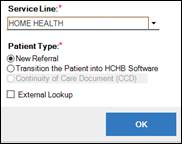
Select Service Line- Home Health from the dropdown and select OK:
-
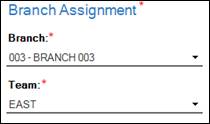
Select Branch and Team:
-
Type the client’s last name and select “tab” or click on the magnifying glass to trigger Patient Lookup:


-
Review client list to determine if previous referral or active client. Scroll over to “Active” and “Status” column to determine if client has an active episode and if discharged, if okay to readmit:
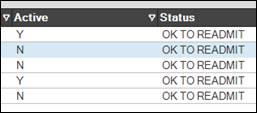
- If “Y” is in “Active” column, this means that client status is currently listed as “Active” in HCHB. Episode MUST be reviewed before client is re-entered into HCHB.
- Episode may be on HOLD status.
-
Episode may be discharged, but client status may have remained “Active” in error. Search for episode in Clinical Input:

- If “Y” is in “Active” column, this means that client status is currently listed as “Active” in HCHB. Episode MUST be reviewed before client is re-entered into HCHB.
- Clients with status “Do Not Readmit” must be addressed with Area Manager.
-
If client is not active (N) and status indicates OK TO READMIT, confirm DOB and demographic information is accurate.

-
If information is accurate, click Select to readmit client:

NOTE: Key demographic information such as Date of Birth and Social Security Number should NOT be edited on a Re-Admit. Editing the client last name or first name is ONLY appropriate if a name change (ie. Marriage, divorce, etc) is confirmed.
Update Referral Source
-
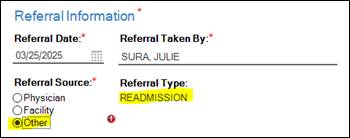
The referral will flag as Readmission. Select Referral Source “Other.
-
In Relationship to Patient, select magnifying glass:

-
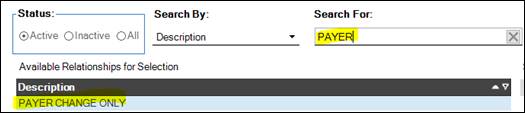
In search bar, type Payer Change Only and select from table:
-
Select Apply Selection:

-
In the free text field under Referral Contact, type the payer change information (Example: MDCR to VA or MDCR NGS to Humana MDCR, etc):

Update Payer Source / Collaborate with Authorization Specialist
- Planned Payer Changes: Authorization Specialist should identify any authorization requirements for new payer source prior to planned payer change to ensure authorization is in place at time of SOC.
- Clinical Supervisors should be alerted for any unexpected payer changes.
- Intake should collaborate with Authorization Specialist as needed.
Update Physician and F2F Information / Collaborate with CCS
- Planned Payer Changes: Clinical Supervisor should collaborate with CCS to ensure F2F requirements are met prior to planned payer changes.
- Physician must be reviewed for PECOS requirement if applicable.
- Unexpected Payer Changes: Clinical Supervisor must alert CCS immediately upon identifying unexpected payer changes. CCS will review F2F needs.
Complete Referral for Re-Admit
Refer to O-11-206 Manually Create Referral in Back Office for detailed process on entering the rest of the referral information.
📅 Effective: 04.03.2025 | 🛠️ Revised: 10.20.2026 | ✅ Approved: JS