
O-14-216 Process POA/LEGAL REPRESENTATIVE Note
👤 RESPONSIBLE POSITION
Business Manager (or Designee) and Area Manager
🎯 PURPOSE
This process provides the steps to be followed when a client has a POA or Legal Representative who may be responsible to sign admission paperwork on behalf of the client.
This workflow generates because of process O-11-211 Create POA/LEGAL REPRESENTATIVE Note, which is completed by the Intake Coordinator when they identify that a client has a Power of Attorney (POA) or Legal Representative.
The Business Manager begins the process below when they receive the coordination note POA/LEGAL REPRESENTATIVE within their workflow, and the Area Manager is later involved if escalation is needed.
🔄 PROCESS
Part 1: Identify SOC Status & Review CC Note
- Under the Review Coordination Notes tab in the HCHB Workflow Console, the Business Manager receives the coordination note type POA/LEGAL REPRESENTATIVE.

The note will generate in HCHB Workflow prior to the mobile forms being uploaded into Mosai because Intake creates this note prior to SOC.
-
Before proceeding with their respective steps, the Business Manager must first identify if the SOC has been completed, as next steps can only be taken after the SOC visit. The status of the SOC visit can be easily seen in workflow under the SOC column.
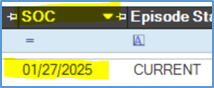
- If the SOC column is empty, the SOC visit either has not yet occurred or the client has been non-admitted. Check the episode status.
- If the episode status is NON-ADMIT, no follow-up is needed. Proceed to step 22.
- If the SOC visit has not occurred yet and the episode status is PENDING, do not proceed. Wait until the SOC visit has occurred, at which point its date will populate in the SOC column as in the example above.
- If a SOC date has generated in the SOC column in workflow, the Business Manager will proceed with step 3.
- If the SOC column is empty, the SOC visit either has not yet occurred or the client has been non-admitted. Check the episode status.
-
The Business Manager navigates to Mosai to locate the admission paperwork that will have been uploaded by the clinician. Following O-7-161 Start of Care Packet Review, the Business Manager locates the documents for that client. The document likely will be missing both a client’s and legal representative’s signature(s); the document will only have been signed and dated by the clinician.
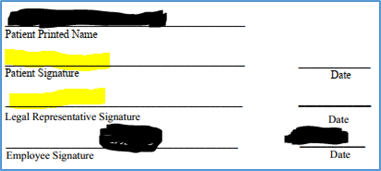
Example of paperwork signature lines signed only by the clinician.
SCENARIO: If you receive paperwork in Mosai which does not have both a client signature and POA/leg rep signature (still needing to be signed), but there is not a POA/Legal Representative coordination note in your HCHB workflow associated to that client:
- Follow up with the clinician to identify if this was an error.
- If the clinician responds that there is a POA/Legal Representative, escalate this verbally with urgency to the Area Manager, as a client in this situation cannot be admitted without consent from the POA/Legal Representative.
- If the clinician responds that it was simply a mistake and the client did intend to sign but there was an issue in the form being submitted successfully, notify the Clinical Supervisor to ensure that admission paperwork is completed as soon as possible.
- If you do not receive a response from the clinician by end-of-day, escalate the situation verbally to the Area Manager. It is important to ensure we do not admit a client who has a POA/Legal Representative without their consent to admit; the absence of a coordination note of this type indicates that there may be an urgent need for follow up from the Area Manager.
In general, if it is ever discovered after the initial SOC process that a client has a POA/Legal Representative, a POA/LEGAL REPRESENTATIVE CC note should be completed at that time and this process followed.
- Complete all routine steps to review the contents of the paperwork as in process O-7-161 Start of Care Packet Review and resolve discrepancies or questions that arise before proceeding.
-
Enter HCHB workflow and navigate to the CC notes tab. Locate the POA/LEGAL REPRESENTATIVE note associated to the client whose paperwork has been uploaded.
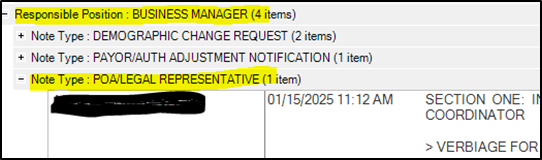
-
Right-click the workflow and select Medical Records Info from the menu, then Coordination Notes from the sub-menu.
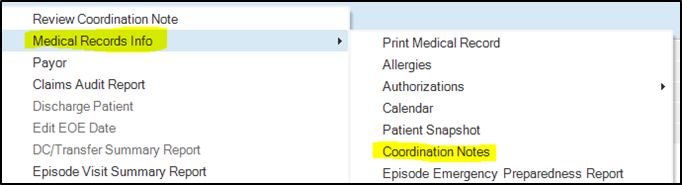
- Select the POA/LEGAL REPRESENTATIVE Note and click Edit (or double-click).

- Review Section One of the template which the Intake team completed, specially looking for the response to this prompt:
> ANY VERBAL CONSENT FOR CLIENT TO SIGN PAPERWORK FOR THEMSELVES?
- If the response is YES, the POA/Legal Representative has given consent that the client may sign paperwork for themselves. Intake will have deleted Sections Two and Three from the coordination note template and documented that consent under Section One as prompted. In this case, the client will have signed their own paperwork, and no follow-up with the POA/Legal Representative is needed; proceed to step 22.
- If the response is NO, the client may not sign for themselves. Proceed to step 9.
Part 2: Call POA/Legal Representative to Obtain Verbal Consent to Treat
-
In Mosai, navigate to the Service Agreement page so that you are able to reference the services on the treatment plan to communicate to the POA/Legal Representative.
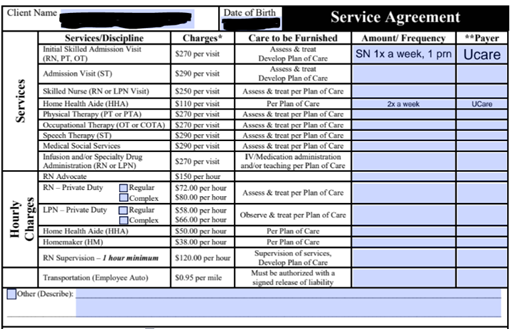
- Identify whether the POA has an email address listed in the POA/Legal Representative note. If not, obtain an email address during step 11 and add that information to the note.
- Call the POA/Legal Representative, using the verbiage in the cc note template (included in the grey callout below).
- Obtain verbal consent to treat. Use the verbiage in the coordination note template and reference the service agreement to communicate the ordered services.
- Communicate that they will receive paperwork via email for them to sign electronically. Paperwork will arrive via email within the next business day.
-
Confirm that the listed email address is accurate.
SECTION TWO: FOLLOW-UP CALL AFTER ADMISSION - BUSINESS MANAGER (OR DESIGNEE)
> VERBIAGE FOR FOLLOW UP CALL (OR VOICEMAIL IF CALL IS NOT ANSWERED)
”ADARA HOME HEALTH COMPLETED THE ADMISSION TO HOME CARE ON (DATE). THE FOLLOWING TREATMENT PLAN HAS BEEN ORDERED (SERVICES AND FREQUENCY). YOU WILL RECIEVE A SIGNATURE REQUEST VIA EMAIL ON ALL REQUIRED CONSENT FORMS. AS A REMINDER WE ARE REQUIRED TO OBTAIN ALL OUR CONSENT FORMS BACK SIGNED IN ORDER TO BILL INSURANCE AND CONTINUE PROVIDING SERVICES."
- In the coordination note, enter your name and the date as prompted.
> VERBAL CONSENT TO TREAT OBTAINED BY: ___ (ADARA EMPLOYEE) ON (DATE): __
-
Save your changes to the coordination note by clicking Save & Close.

Part 3: Route the Mobile Forms to Medical Records to Be Sent for Signature
- In Mosai, while still viewing the document, input the following data into the fields on the right-hand side of the document.
- Case Name: Lastname, Firstname SOC MM.DD.YY”
- Type: Start of Care Packet
- Status: MR – POA Paperwork Needing to Be Sent
-
Security Group: Client Branch Location
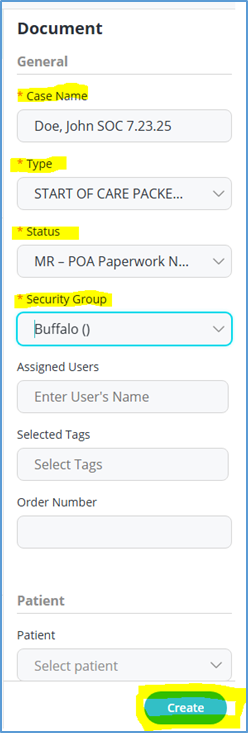
- Create the case by selecting Create in the lower right. The document will close and will no longer be present in your mobile forms bucket.
- This routes the document to the medical records department to be sent to the POA via email for signature. The medical records team will email the paperwork to the POA within one business day.
Part 4: Area Manager and Business Manager Follow Escalation Steps for Unsigned Forms
- If the POA does not sign the paperwork within two business days, the Medical Records Specialist will email both the Area Manager and Business Manager notifying them so that they can follow up with the POA in the escalation steps below.
- When the Area Manager and Business Manager receive this notification that the paperwork has not been signed, they will follow these escalation steps below, using the verbiage in the CC note template. The initial escalation may be completed either by the Area Manager or the Business Manager, but 2nd and 3rd escalation steps must be completed by the Area Manager.
-
If at any point during these steps the forms come back signed, proceed to step 22.
-
-
As follow up is completed is subsequent steps, update the coordination note in workflow by adding follow-up comments (accessed by opening the workflow task and selecting Add Follow-Up Comments).

- Complete Initial Escalation - Two business days after paperwork sent by MRS
- Follow up is responsibility of Area Manager or Business Manager/designee)
- Purpose of initial escalation is to clarify POA contact information and ensure POA understands consent form are required back signed to bill insurance and continue services.
- Use the verbiage in the coordination note, referenced here:
-
FOLLOW UP AFTER INITIAL MRS ESCALATION - AREA MANAGER OR BUSINESS MANAGER/DESIGNEE
> VERBIAGE FOR FOLLOW UP CALL (OR VOICEMAIL IF CALL IS NOT ANSWERED)
"THIS IS A CHECK-IN CALL TO ENSURE YOU ARE RECIEVING EMAILS FOR CONSENT TO BILL INSURANCE AND PROVIDE ONGOING HOMECARE SERVICES FOR [CLIENT NAME]. IF YOU ARE NOT RECEIVING THESE EMAILS PLEASE CALL IMMEDIATELY SO THAT WE CAN CORRECT YOUR CONTACT INFORMATION. AS A REMINDER WE ARE REQUIRED TO OBTAIN ALL CONSENT FORMS BACK SIGNED TO AVOID DELAYS IN CARE."
- Complete 2nd Escalation - Four business days after paperwork sent by MRS
- Follow up is responsibility of Area Manager
- Purpose of second escalation is to notify POA that failure to provide agency with signed consent forms will result in our inability to bill insurance requiring us to place services on hold.
- Use the verbiage in the coordination note, referenced here:
-
FOLLOW UP AFTER 2ND MRS ESCALATION - AREA MANAGER
> VERBIAGE FOR FOLLOW UP CALL (OR VOICEMAIL IF CALL IS NOT ANSWERED)
"THIS CALL IS TO DISCUSS CONCERNS RELATED TO NOT HAVING CONSENT FORMS BACK SIGNED FOR [CLIENT NAME]. IN ORDER TO CONTINUE SERVICES AND PREVENT THE CLIENT BEING BILLED FOR SERVICES ALREADY PROVIDED, WE MUST RECIEVE OUR CONSENT FORMS BACK SIGNED."
- 3rd Escalation - Six business days after paperwork sent by MRS
Contact Compliance Manager - this is required prior to completing 3rd escalation.
- Follow up is responsibility of Area Manager
- Purpose of third escalation is to inform POA and coordinate services being placed on hold.
- Use the verbiage in the coordination note, referenced here:
-
FOLLOW UP AFTER 3RD MRS ESCALATION - AREA MANAGER
NOTE: THIS CALL IS TO DISCUSS HOLDING SERVICES. COMPLIANCE OFFICER MUST BE LOOPED IN BY THE AREA MANAGER PRIOR TO THIS CALL.
> VERBIAGE FOR FOLLOW UP CALL (OR VOICEMAIL IF CALL IS NOT ANSWERED)
"CONSENT HAS NOT BEEN OBTAINED TO BILL INSURANCE OR CONTINUE SERVICES FOR [CLIENT NAME]. YOU WILL BE RECIEVING A LETTER EXPLAINING ALL OF THIS IN DETAIL AND IN ADDITION [CLIENT NAME]'S PROVIDER HAS BEEN MADE AWARE OF OUR INABILITY TO CONTINUE SERVICES DUE TO LACK OF CONSENT."
Part 5: When Forms Are Signed, Complete Workflow
- When the paperwork is received back signed, the Medical Records Specialist will place the signed paperwork in the branch Administrative Assistant mobile forms bucket for them to attach. The Administrative Assistant will then print and mail a copy of the paperwork to the client’s address and attach the paperwork to the client’s chart in HCHB via Mosai.
-
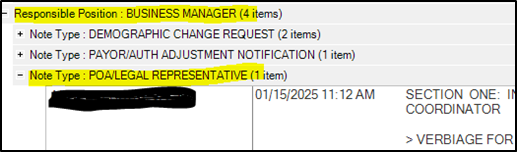
In HCHB Workflow, the Business Manager opens that client’s Review Coordination Notes workflow for the cc note type POA/LEGAL REPRESENTATIVE.
-
Select Review Coordination Note.

-
Exit out of the coordination note review screen and click Note Reviewed.

📅 Effective: 01.28.2025 | 🛠️ Revised: 04.28.2026 | ✅ Approved: JFJ