
O-6-101 Submitting an External Job Requisition
👤 Role
Hiring Manager or Designee
ATTENTION
Must have Manager Role in Dayforce
🎯 Purpose
When a hiring manager is looking into posting a job to external candidates on the Adara Website and external job boards (i.e. Indeed), they will need to submit a new job requisition to Recruiting. This process shows the steps to submit a new job requisition request in Dayforce.
When a requisition request is submitted to be posted externally it is also posted internally for current employees to view on the Dayforce Careers page.
NOTE
If the posting is intended to be posted internally only, the hiring manager will need to specify that under Additional Notes.
🔄 Process
-
In Dayforce under the Manager Role, select Recruiting.

-
In the upper right, click Create New Job Requisition.

- Fill the fields with as much information as possible, as this information will be used when screening candidates and when creating offer letters.
-
Choose Location (Office), Job Assignment, and Hiring Manager.

- Select the checkbox for Send Pre-Hire Questionnaire Automatically so that it will automatically be sent.
-
Leave the checkbox unchecked for Send Post-Application Questionnaire Automatically. The Recruiting department will send this at a later time.

-
The hiring manager will be the main point of contact, but additional users can be added at the bottom of the page and everyone listed will also be able to access the requisition/candidates.

-
The Job Description field can be left blank or as-is.
NOTE
Recruiting will add the Job Description prior to posting.
-
Add the Number Of Openings, and select Pay Class and Pay Type.

-
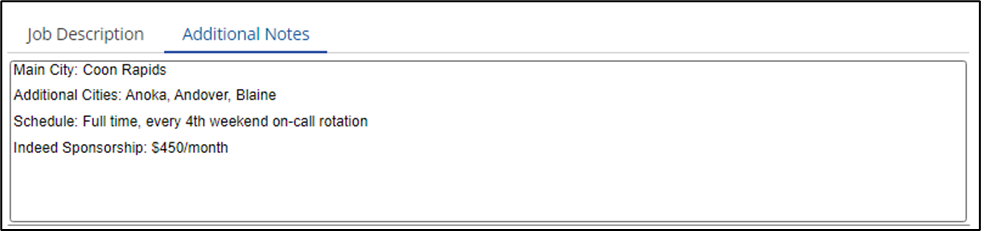
Use the Additional Notes field to include any specific information about the posting.
EXAMPLES
- Hours, Schedule, and On-Call rotation frequency.
- Main city, and additional cities the role will cover (Field Positions).
- Client-specific needs (Private Duty Positions).
- Indeed Sponsorship (If amount is not specified, Recruiting will sponsor it for $450/month).
- Click Submit.
📅 Effective: 01/24/2024 | 🔍 Reviewed: 03/24/2025
🛠️ Revised: 05/06/2026 | ✅ Approved: JFJ