
O-5-118 Company Credit Card Tie Out Approval
👤 RESPONSIBLE POSITION
Area Managers, Corporate Managers, or Designees
🎯 PURPOSE
After an expense report is created in CompanyMileage.com that matches the company credit card statement, the expense report needs to be approved by a supervisor before it can be recorded in the financial statements. This provides managers the opportunity to review purchases made on the company credit card and ensure all the required components of a business expense exist.
All expenses should include a receipt (or an explanation as to why no receipt exists), what qualifies the purchase as a business expense (who was present, what it is for, etc…) and appropriate categorization of the expense for financial reporting purposes.
🔄 PROCESS
-
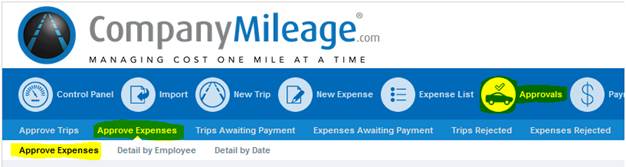
To approve an expense report, log in to companymileage.com and navigate to Approvals.
-
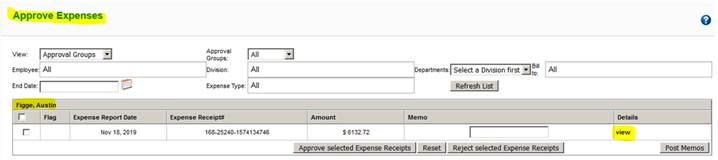
This will show you a list of submitted expense reports that are awaiting approval. The name of the individual submitting the report is in the upper left corner and the summary of the report show the date and amount. Select the view button to expand the expense report.
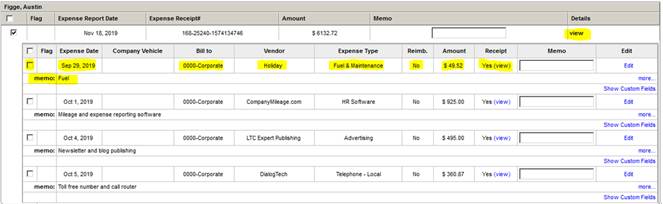
- Once you have expanded the report, review each item for the components of a valid business expense. You should see the expense date, what office it is charged to, the vendor name, type of expense, whether it is reimbursable, the amount, the receipt details and the memo explaining what qualifies it as a business expense.
- All company credit card expenses should have No for whether it is reimbursable because they are paid on a company credit card. This is determined by the payment type they selected when entering the expense. Be sure to check that they all say no in the reimbursable column.
- Next check the amount and review the receipt.
- Finally verify there is a memo entered and that the entries in Bill To, Vendor, Expense Type and Amount makes sense.
-
As you approve items, you can check the box to the left or you can wait to the end to check the box for all of them.
- If the expense report was created correctly, it should match the total amount for the company credit card statement that will be sent to each CC user at the end of each month.
-
Check the check box to the left of the whole expense report and then select the Approve Selected button to process the expense report.
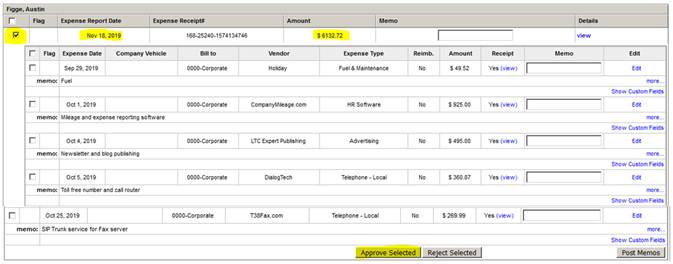
- Unless there is something marked as Yes for Reimbursable, approve the report so it can flow to the GL. Since this is on a company credit card and thus already paid, we will always approve the expense reports that match the company credit card statement and will address improper use of the company credit card through different mechanisms. They will not be rejected in the companymilage system as that simply complicates the month end tie out process.
- When they are approved, the accounting department will match up each expense report total to credit card statement total to double check that all expenses are entered. Then they will export the details to the accounting system in order to appropriately distribute them to their expense accounts.
📅 Effective: 01.21.2020 | 🛠️ Revised: 11.13.2026 | ✅ Approved by: JFJ