
O-11-502 Review Medication Entries
🎯 PURPOSE
To describe the process for reviewing for accuracy of medications entered into the electronic medical record system (EMR).
🔄 PROCESS
Orders will be reviewed that contain medication changes within the electronic medical record system for accuracy and requirements that include: high risk flags as indicated, indications/reason/diagnosis, medication setup flags, times for agency setup, and applicable instructions.
- Medication entries may be captured in multiple order types. Refer to associated processes as needed for direction related to the specific task: O-14-501 REVIEW AND APPROVE NEW ORDER. Other examples may include REVIEW/EDIT/APPROVE 485 ORDER (task 2), and REVIEW/EDIT/APPROVE ROC ORDER.
- Each medication will be reviewed to ensure the following components are present and accurate when there are medication changes within the EMR system.
- High risk flag (if applicable)
- Indication/reason/diagnosis are listed for all high risk
- Medication setup flag is selected (if applicable)
- Medication times are listed if medications are set up by agency
- All applicable instructions are added
-
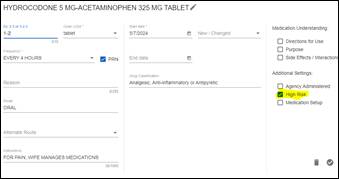
Review medications for high risk flags by viewing high risk column. All identified medications that fall under the following high risk drug classes (Antipsychotics, Anticoagulants, Antibiotics, Opioids, Antiplatelets, Hypoglycemics) should be flagged and identified as a high risk medication (see high risk medication tip sheet and Lippincott resource).

-
Select Edit Transaction for medication and update flag if incorrect

-
-
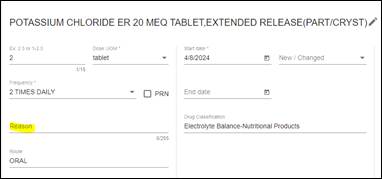
Review indications/reason/diagnosis client is taking the medication for by viewing the instructions column. It is preferred that all medications include an indication but is required for all high risk medications.

- If indication for high risk medication is unknown, contact clinician that entered medication for follow up with the provider to clarify reason/indication medication is ordered.
-
If indication is missing, edit transaction for medication and add indication to the reason field prior to approving the order.

-
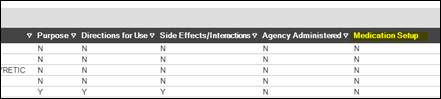
Review medications for medication setup flag by viewing the medication setup column of each medication. If medication instructions indicate that medication is setup by agency, ensure medication setup flag is selected with review.
-
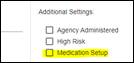
Select edit transaction for medication if setup flag needs to be changed.

-
- Review medications for times under the instructions column if setup by agency.
-
Collaborate with clinician for missing times. Select Edit Transaction for medication if missing following collaboration.

- Examples of times: 0800, 2100, AM, PM, Noon
-
Example of clear setup instructions: Adara to setup 20mg daily at 0800.

-
-
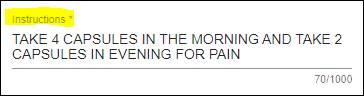
Review medications for all applicable instructions under the instructions column. Instructions may include but are not limited to; directions for use (sliding scale insulin information, special directions for administration, instructions for “as directed” medications), any secondary physician prescribing medications if different than primary care provider, and who is managing medications.

- Clear documentation of management of medications should be present.
- Examples include; “Adara to setup”, “Alf managing”, “daughter managing”
-
Collaborate with clinician and select Edit Transaction for updates:

- Clear documentation of management of medications should be present.
📅 Effective: 04.09.2024 | 🛠️ Revised: 09.23.2026 | ✅ Approved: KD