
O-4-124 NETStudy 2.0 - Rapbacks and Registry Rechecks
🎯 PURPOSE
NETStudy 2.0 provides a more comprehensive background study that is updated if new criminal or maltreatment information is received on employee’s who are on Adara Home Health active roster. Adara is notified if new information about an employee that may have changes the person’s background study status. Updated background study information is available in the Rapback Determination Available queue.
In addition, updates to the employee's status in various registries will require those registries to be rechecked. When provider registries (listed below) are initially checked by entity users at the time the background study application is completed, NETStudy 2.0 will automatically check the registries on an on-going basis and inform the entity via an email if there is a change in the employee’s registry status. This process, which is sometimes referred to as “registry rapback,” interfaces with the following three registries to check for updated information:
- Minnesota OIG Excluded Individuals
- Federal OIG List of Excluded Individuals and Entities (LEIE)
- Minnesota Nurse Aide Registry
🔄 PROCESS
If a rapback determination is received:
Adara Home Health will receive an email notification stating that a revised background study determination is available. The revised background study determination invalidates the original determination and the entity is responsible for logging into NETStudy 2.0 to review the updated information and take action as required. In most cases, Adara must take action as a result of the new information.
If a registry recheck notification is received:
If a new potential match is identified, the employee and match information will display in the Registry Recheck queue. If there is a possible new match on the state or federal exclusion lists or Nurse Aide Registry for a employee who is currently affiliated with your entity, you will be notified by a system generated email.
Adara Home Health is responsible for reviewing any potential matches and taking the appropriate action based on the information as it applies to the Adara. A match on a provider registry may not change the employee’s background study status, but providers may need the information for other purposes.
The matching process is completed using the employee’s name and date of birth. The entity is responsible for checking the applicable registry and determining whether the potential match belongs to the person and whether action is needed.
View Rapback Determination Details
- To access the Rapback Determination Available queue, click the Applications tab in the toolbar.
- In the dropdown, select Rapback Determination Available. Employees in this queue will have a “disqualified” study status and may request reconsideration.
- To view the employee’s new determination notice and subsequent background study documents:
-
Locate the employee’s determination record in the Rapback Determination Available queue and click on the individuals last name to go to the Person Summary page.

-
-
Click on the Documents tab.

-
In the Document name column, click on the blue hyperlink document name. To be sure you are opening the most recent background study document, click on the most recent document in the Uploaded Documents section. The document will open in a new tab.

Remove from Roster – Disqualification (after a Rapback)
Members of the Adara Home Health team including HR determine if the employee is able to remain working and affiliated with the company.
If the employee is determined Ineligible and Adara doesn’t want to continue employment with this individual they must be removed from Adara Home Health roster.
To remove a study subject from the roster from the Rapback Determination Available Queue:
-
Locate the study subject’s application in the Rapback Determination Available queue and click the on the Remove From Roster button in the Affiliation Status column.

-
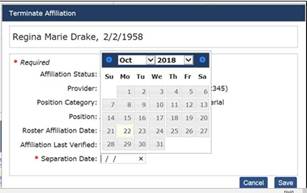
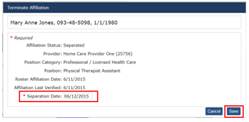
When the Terminate Affiliation box displays, use the pop-up calendar to record the date on which the study subject is no longer affiliated with the entity in the Separation Date field.
-
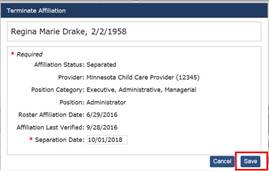
Click the Save button. The study subject will be removed from the entity’s active roster and placed on the separated/inactive roster, and the study subject’s background study application is withdrawn.
Request for Reconsideration Status (after a Disqualification after a Rapback)
Employees who are disqualified have the right to request reconsideration of their disqualification.
If Adara remains affiliated with the employee during their request for reconsideration, Adara will have access to the status of the request for reconsideration in the Rapback Determination Available queue.
- Request for Reconsideration Status and the Days Remaining to Appeal columns provide information about the status of the employee’s request. There are two statuses that display in the Request for Reconsideration Status column:
-
Employee’s can request reconsideration. The employee is disqualified and is within their timeframe to request reconsideration of their disqualification. Once the appeal deadline to request reconsideration has passed, the employee may no longer request reconsideration and if the entity remains affiliated with the individual, the entity must submit a new background study request.

-
Request for reconsideration is in process. The employee is disqualified and has requested reconsideration of their disqualification.

-
- Supervision Status: NETStudy 2.0 displays the study subject’s current supervision status in the Supervision Required column. The status is available as a convenience to users, and entities must still view all background study notices. The following supervision statuses are available in this queue and use them as the source record.
- No: The employee is disqualified and may request reconsideration of their disqualification and is not required to be supervised during their reconsideration timeframe.
- Yes: The employee is disqualified and may request reconsideration of their disqualification, but must be under continuous, direct supervision during their reconsideration timeframe.
-
Remove: The employee is disqualified and may request reconsideration of their disqualification, but must be removed from any position that required a DHS background study during their reconsideration timeframe.

Registry Recheck
Verify the Registry Recheck Status
-
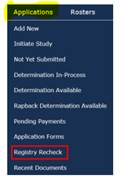
Click on Administration at the top tool bar. Click Registry Recheck from the drop down
-
Click on the hyperlinked registry name in the Registry column to open registry, page will open in a new tab.

-
Return to the NetStudy 2.0, under Actions column, click View Registry Recheck. Certain details for the potential match will appear.
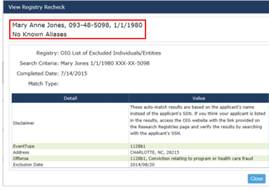
- The employee’s name must be confirmed with the registry data to determine if the new information identified on the registry belongs to Adara’s employee. To complete this search, follow the instructions on the screen, as the search for each registry is completed differently. Also, be sure to also check all aliases. The subject applicant’s aliases entered in NetStudy 2.0 can be viewed on the Person Summary page by clicking on the applicant’s last name from any of the queues.
- Return to the NetStudy 2.0 and take one of the following actions under the Actions column.
-
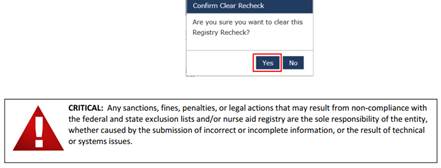
Clear Registry Recheck: Select this option if the new registry information does not belong to the study subject, or if the information does belong, but your entity will continue to be affiliated with the person.

-
When the Confirm Clear Recheck box displays, click Yes.
-
-
Removed from Roster: Select this option if the new registry information belongs to the employee and Adara is ending their affiliation with the person.

-
-
When the Terminate Affiliation box displays, record the date field the study subject’s affiliation ended in the Separation Date field; then click Save.
📅 Effective: 08.13.2019 | 🛠️ Revised: 10.30.2026 | ✅ Approved: JFJ