
O-4-122 NETStudy 2.0 - Reset Password
🎯 PURPOSE
If you forget your password or you get locked out of your NETStudy 2.0 provider account, follow the instructions below to reset your password or unlock your account.
🔄 PROCESS
-
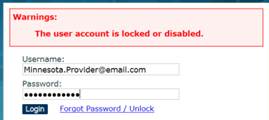
Click the Forgot Password/Unlock link. Your user account will become locked after too many login attempts.
-
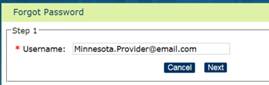
Enter your username in the Username field and click Next.
-
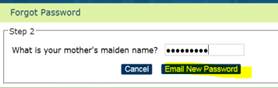
Answer your security question and click Email New Password.
- You will receive a system-generated email from dhs.netstudy2@state.mn.us containing a new generic password. If you do not receive the email within five minutes, check your junk mail.
- Return to the login page. Enter your username in the Username field and enter the new temporary password you received by copying and pasting the password into the Password field.
-
Click Login.

- The system will prompt you to change your password to something of your choice. Your password must contain:
- 8-16 characters
- one or more uppercase letters
- one or more lowercase letters
- one or more numbers
- one or more special characters
-
You will also be asked to choose a security question and provide the answer.
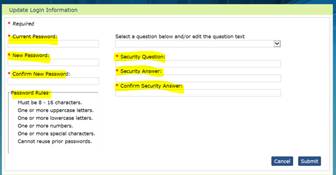
- After you change your password and provide a security question and answer, click the Submit button to log into NETStudy 2.0.
📅 Effective: 05.01.2016 | 🛠️ Revised: 10.30.2026 | ✅ Approved: JFJ