
O-2-233 Medicare MBI Lookup via NGSConnex
👤 RESPONSIBLE POSITION | ROLE
Elig/Auth Coordinator | Authorization Specialist
🎯 PURPOSE
When needing to identify a client's Medicare ID number (MBI), this may be obtained when appropriate via the NGSConnex portal.
After obtaining the MBI, it must be entered into a payer in HCHB so that eligibility can be ran for Medicare via HCHB.
You must have the individual’s name, date of birth (DOB), and social security number (SSN) to look up an MBI number.
🔄 PROCESS
- Log on to website: https://provider.wellpointfederal.com/landingpage/
-
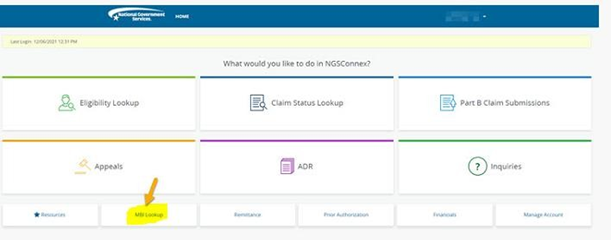
Click MBI LookUp (bottom left of screen). This will open a window to lookup the MBI number.
-
When window opens, MBI Lookup comes up you will be asked to verify you are not a robot. Click on the I’m not a robot box and completed.
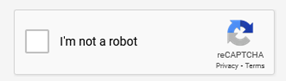
- After confirming specific images a pop-up window will reappear.
-
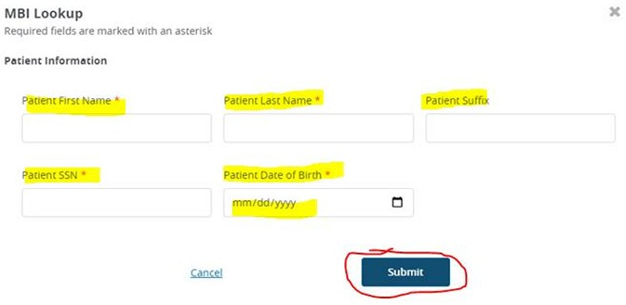
Enter the patient information; First name, Last name, Social Security Number and Date of Birth (in format mm/dd/yyyy); then click Submit.
-
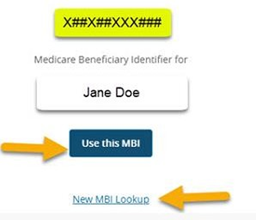
If the information is correct and the client is eligibile for Medicare, the beneficiary MBI# and name will display.
- If the search criteria entered is invalid, does not match what is on file with the Social Security Administration, or is for a deceased Medicare beneficiary, whose date of death is more than four- years prior to the date of death, an error message will display.
- Select the New MBI Lookup link to initiate a search for a different patient.
- If you have completed all of your MBI Lookup searches, select the ‘X’ in the upper right hand corner.
📅 Effective: 10.23.2026 | 🛠️ Revised: N/A | ✅ Approved: JFJ