
O-11-518 Edit Medication Set Up Flag
🎯 PURPOSE
Describes how to edit the Medication Set Up Flag in the HCHB Back Office to designate a medication for set up within the medication profile. Adding this flag pulls the medication to the Medication Set Up visit action for the clinician to document in PointCare.
🔄 PROCESS
-
Go to Clinical Input:

Find the patient and select the patient snapshot icon:

- You may alternatively right-click the patient name, opening a menu; from that menu select Medical Records and then Medications.
-
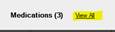
If viewing the patient snapshot, select Medications- View All to access patient medications:
-
Identify medications indicated as Agency to Set Up. Clinicians should be entering this information in the Instructions field of the medication:

- The Medication Set Up flag can be edited in one of two ways:
-
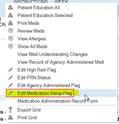
Right-click on the selected medication and select Edit Medication Setup Flag:
-
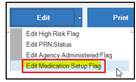
Select the medication and then at the bottom of the screen select Edit and Edit Medication Setup Flag:
-
-
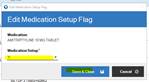
On the Edit Medication Setup Flag screen, click on the Medication Setup drop down and select Y. Then, Save & Close:

📅 Effective: 08.24.2023 | 🛠️ Revised: 10.20.2026 | ✅ Approved: JS