
O-11-415 Create Non-Visit Activity - Salaried Aide Office Time
👤 RESPONSIBLE POSITION | ROLE
Business Manager, Staffing Manager, or other Designee
🎯 PURPOSE
This Non-Visit Activity (NVA) type, Salaried Aide Office Time, is entered by office to capture non-visit in-office time for salaried Home Health Aides. Examples of reasons for an NVA entry of this type include:
- In-Office Meetings
- In-Office Education/Training (including time worked completing Annual Education)
- In-Office Time Worked
This NVA type defaults to the branch office location. Because of the destination being entered as the branch office location, this NVA will also generate mileage data for mileage reimbursement for their mileage to the office if it is not their first business stop of the day.
NOTE
This NVA entry does not directly pay the aide hourly. The salaried aide should be clocked into Dayforce during this time worked, just as they would for any other time worked.
The NVA is entered into HCHB for mileage reimbursement and tracking purposes.
🔄 PROCESS
-
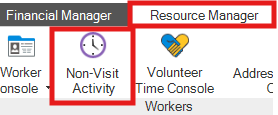
Under the Resource Manager tab, select NVA Console.
-
Select Add.

- Complete the following fields as prompted:
- Branch: Select the relevant branch location.
- Worker Type: Select Agent.
- Worker Name: Select the worker's name.
-
Type: Select the type Salaried Aide Office Time.

-
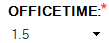
OFFICETIME: Enter the total amount of hours the employee worked in-office for this entry.
- Date: Select the date the work was completed.
- Start Time: Enter the start time of the time worked.
- End Time: Enter the end time of the time worked.
-
Destination: The Destination will default to the branch office location. Leave this as-is unless the branch office location wasn't the employee's destination (in which case a different type of NVA is probably needed).

Example -
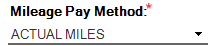
Mileage Pay Method: Ensure that Actual Miles is selected.
-
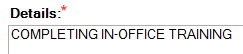
Details: Enter a brief description of the reason for the time worked.
Example
NOTE
The time entered must also include travel time to the destination (if applicable), as time listed in NVA should capture all payable time for that instance of time worked, which would include travel from one business stop to another.
EXAMPLE
If an employee travels from a client's home to the office and their journey takes 1/2 hour, and then the employee works at the office for 1 hour, the NVA should be entered for 1.5 hours, including the office as the location of the work so that the employee is also reimbursed for their mileage to the office location.
-
After all fields are complete, select Save & Close.

- After this has been saved, the NVA will later need to be accepted so that it will be processed for payroll.
📅 Effective: 10.06.2026 | 🛠️ Revised: N/A | ✅ Approved: JFJ