
O-9-501 Print Certificates in Home Care Pulse
🎯 PURPOSE
Most courses will issue a certificate upon completion of the course, which is accessible through your profile. The steps below outline the instructions on how to manually download the certificates. Once the certificate is downloaded, it can be saved or printed.
NOTE: Certificates can only be accessed using the Home Care Pulse web portal https://learn.knowingmore.com/start.
🔄 PROCESS
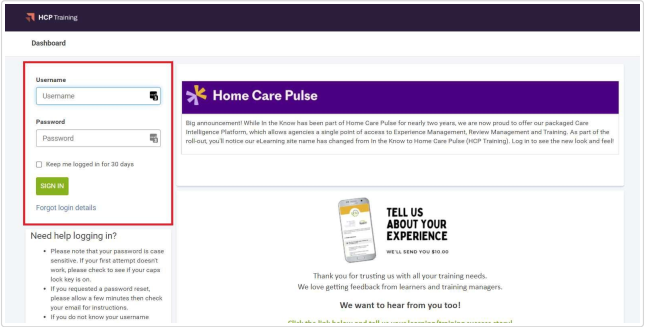
- Go to https://learn.knowingmore.com/start (http://learn.homecarepulse.com) and log in:
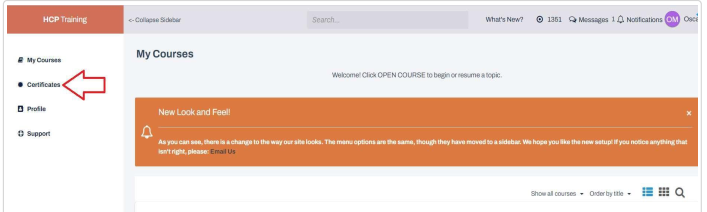
- Go to Certificates:
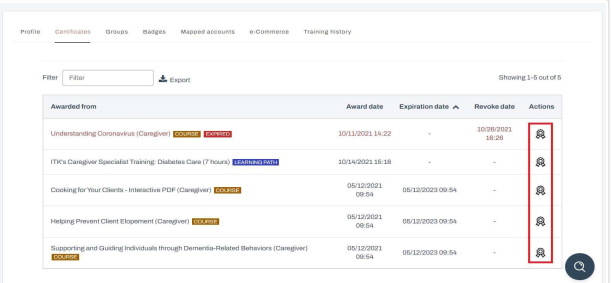
- You will now see a list of your certificates. Click the certificate icon to view and download or print the selected certificate:
IMPORTANT: Save or print certificates you want to retain before October 1, 2026.
📅 Effective: 09/18/2026 | 🛠️ Revised: | ✅ Approved: GS