
O-11-102 Tracking In-Service Training and Education
👤 RESPONSIBLE POSITION | ROLE
Office Employee(s) Designated by Area Manager (Business Manager, Clinical Supervisor, and/or Other Designee)
🎯 PURPOSE
This process defines how office locations track and document workers' completion of in-service training or education, typically facilitated by corporate personnel.
Home health agencies must ensure direct care employees receive a certain amount of in-service training during each 12-month period of employment. Examples of these types of training would include company-wide clinical education on medication management, OASIS, or plan of care management.
This information is tracked in Home Care Home Base (HCHB) using an HR Log. This HR Log entry must record the specific courses and contact hours the worker has completed, ensuring that appropriate and specific documentation is on file and accessible for later review.
These HR log entries will also later be referenced when tracking for clinicians’ meeting annual education requirements.
🔄 PROCESS
- After a worker has completed the education or training, add an HR Log entry by complete these following steps.
-
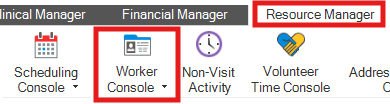
Navigate to the Worker Console under the Resource Manager tab and select a worker.
-
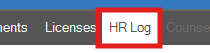
Select the HR Log tab.
-
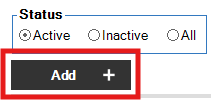
Click Add.
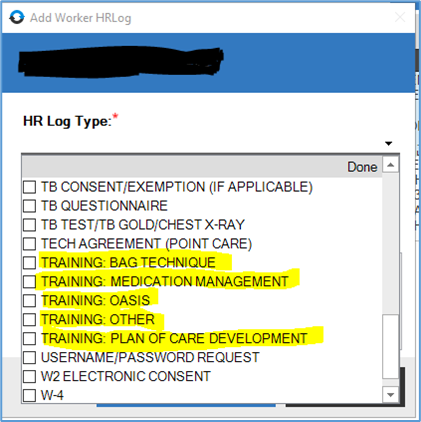
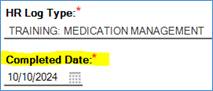
- From the dropdown, select the appropriate HR Log type. Types include:
- TRAINING: BAG TECHNIQUE
- TRAINING: MEDICATION MANAGEMENT
- TRAINING: OASIS
- TRAINING: OTHER
-
TRAINING: PLAN OF CARE DEVELOPMENT
-
Enter the Completed Date. This should the actual date the training was completed.
- In the Comments section, enter the specific training and contact hours completed by the worker, using the template provided by the training organizer (usually a corporate staff member).
-
Click Save & Close.

📅 Effective: 10.22.2024 | 🛠️ Revised: 09.11.2026 | ✅ Approved: JFJ