
O-6-412 Award Honor Hours
👤 ROLE
Manager Role
🎯 PURPOSE
This process shows the steps by which a manager awards Honor Hours to an employee via a pay adjustment in Dayforce.
🔄 PROCESS
-
Logged in as a manager, navigate to Timesheets.
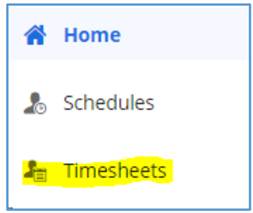
When in your manager role in Dayforce, employees’ timesheets listed will default to your own team, except for Area Managers, whose employee timesheets will default to include all branch employees.
- Within Timesheets, locate the employee and date associated to the honor hours award. If the award is not associated to a specific date, the pay adjustment may be placed on the Saturday of the week.
-
After selecting a day within that employee’s week, select the arrow beside the icon shown and choose Add New Pay Adjustments from the dropdown.
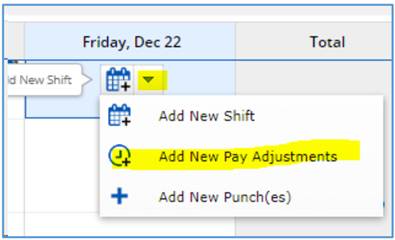
- A pop-up will open. Select the pay adjustment type Award Honor Hours.
- Enter the number of hours that the employee should be awarded.
- Enter a comment documenting the reason.
-
Select OK.
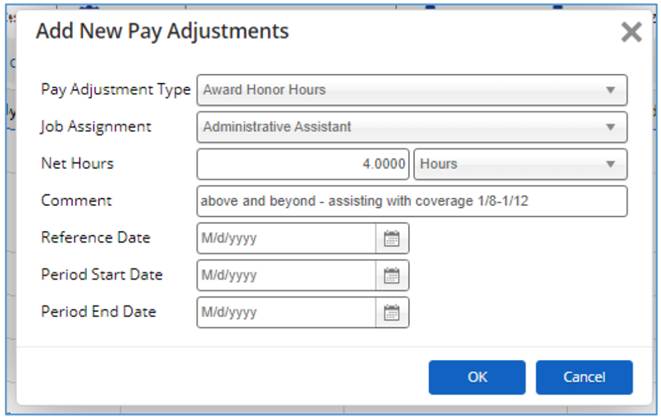
Example of a pay adjustment awarding four (4) Honor Hours.
-
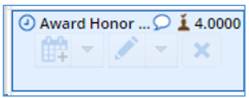
Select the pay adjustment on the calendar.
-
Select Authorize to complete manager authorization of the time adjustment.
-
Click Save to save the pay adjustment entry.
📅 Effective: 01.15.2024 | 🛠️ Revised: 08.17.2026 | ✅ Approved: JFJ