
O-9-213 Managing Mosai Inbox - Administrative Assistant
👤 RESPONSIBLE POSITION | ROLE
Administrative Assistant
🎯 PURPOSE
Mosai Inbox is where all inbound faxes, items sent via Mosai Direct Connect and items sent via the Send to Forcura print driver are received and managed. The following process outlines best practices for inbox settings and identifying/labeling documents received in Inbox as referrals.
🔄 PROCESS
|
Table of Contents |
|---|
| Mosai Inbox |
| Recommended Inbox Settings |
| Sorting Faxes in Mosai Inbox |
| Labeling a Document in Inbox as a Referral |
Mosai Inbox
Primarily managed by Administrative Assistants and Intake Coordinators.
1. View Pending Transmissions from the main dashboard:
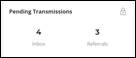
- Items may be flagged as a “referral” due to Mosai IQ, or may be designated as “referral” by Admin or Intake.
- Select Inbox to view all new faxes.
- Any items sent to Mosai via Direct Connect/Print to Mosai will pull into Inbox.
NOTE: “Referrals” will be included in the number count in “Inbox”, but faxes categorized as “Other” within the inbox will not be included in the number count for “Referrals”.
Recommended Inbox settings
-
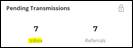
Click on Inbox:
-
Select icon to adjust view settings:

-
Select Manage Columns:
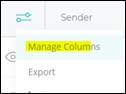
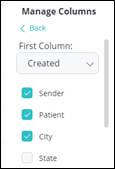
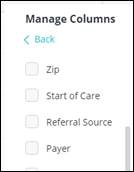
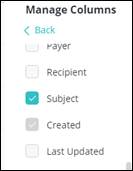
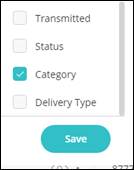
- Set up Columns per images below. These settings allow the user to filter by all column headers and keep all items on one screen without needing to use the scroll bar at the bottom.
-
First Column: Select Created from the drop down. This will allow the user to sort faxes by creation date/time.
-
Un-check the following fields: State, Zip, Start of Care, Referral Source, Payer, Recipient, Last Updated, Transmitted, Status and Delivery Type.
-
The only boxes that should remain checked are: Sender, Patient, City, Subject, Category.
-
Select Save.
-

Sorting Faxes in Mosai Inbox
- Click on a column header to sort faxes in Inbox by that column type.
-
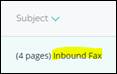
For example, click on Subject to sort column by “inbound fax” or “direct connect”.
-
- Click on Category tab to sort column to move “Referral” to the bottom.
-
This will allow Administrative Assistant to better manage “other” faxes as they are received:

-

Labeling a Document in Inbox as a Referral
-
If file received is for a new/pending client and has not already been flagged as a referral, click on the toggle Referral Document.
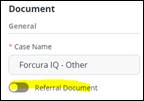
-
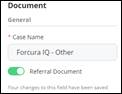
The toggle will change to be 'on'. Then close out of the file and it will move to “Referrals” for Intake to review:
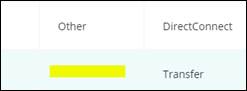
NOTE: When the “Referral” label is toggled off, it will return to Inbox with nothing listed under Category. Administrative Assistants must watch for these as they filter.
📅 Effective: 03.25.2025 | 🛠️ Revised: 10.21.2026 | ✅ Approved: JS, JFJ