O-14-167 Family Link Workflow Tasks
👤 RESPONSIBLE POSITION
Business Manager
Administrative Specialist
🎯 PURPOSE
Two different workflow tasks may generate for Family Link, depending on a change in client status, or an update to client approval in the referral. This includes when “Client Approval Received to Release Medical Data to Family Link Website” is changed from N to Y in a current episode.
🔄 PROCESS
- Workflow tasks will generate to both Administrative Specialist and Business Manager to allow for timely completion:

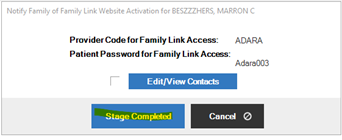
Task: VERIFY CLIENT APPROVAL TO RELEASE MEDICAL DATA TO FAMILY LINK WEBSITE
- If either task generates, do the following:
- Review Rights/Responsibilities/Consent (RRC) form to determine if client “opted out”
- Confirm appropriate setting in current client referral (Clinical Tab):
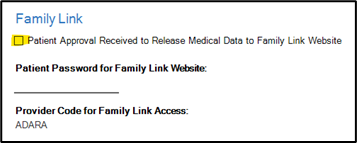
If Opted Out is initialed on the RRC , this box should NOT be checked:
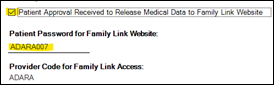
If Opted Out is NOT initialed on the RRC form, this box SHOULD be checked and password entered:
3. Once completed, Stage Complete the workflow: