
O-11-215 Set Up Family Link Access in Client Referral
👤 RESPONSIBLE POSITION
Intake Coordinator / Clinical Intake
🎯 PURPOSE
When the client referral is set up in HCHB, the office sets up the client's default access to a client portal, Family Link. In this portal, the client will be able to access their patient instructions and information.
This process below applies to every new client admission, and must be completed by Intake prior to the Start of Care.
For your background knowledge:
Later, at the Start of Care, the client is given the opportunity to withhold consent to access this portal, in which case the data entered in this section below will be removed.
This means that if you later see a client record in which this section has not been filled out, this may not be a mistake. This is likely intentional due the client withholding their consent and these fields later being cleared by the back office after the Start of Care visit.
🔄 PROCESS
- In the client referral, navigate to the Clinical tab.
-
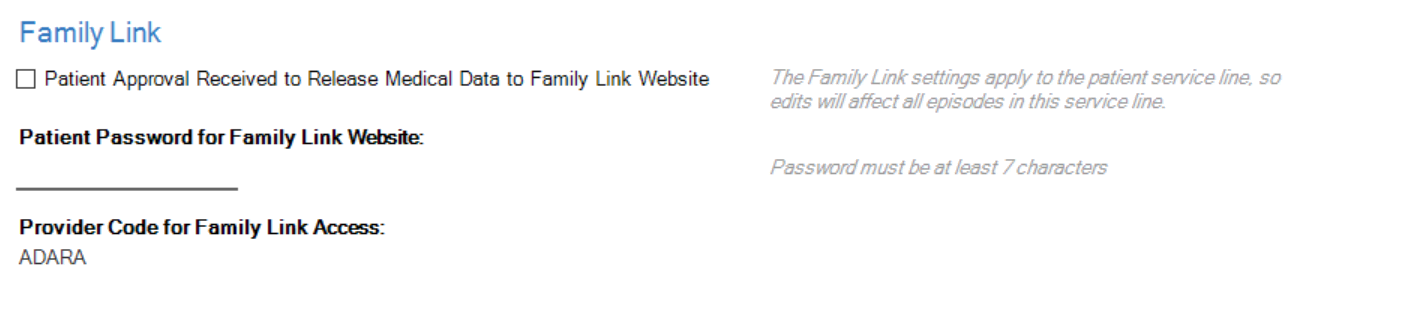
Scroll down to the Family Link section, which is near the bottom of the Clinical tab.
-
In this section, check the checkbox beside the field Patient Approval Received to Release Medical Data to Family Link Website.

-
Then, enter the branch default patient password, which is set up as "ADARA___" with the 3-digit branch code following the word ADARA. Use the key below to enter the correct default patient password for your branch. The password is not case-sensitive.

KEY
Default patient Family Link passwords per branch:
- Buffalo: ADARA003
- Rochester: ADARA004
- Mankato: ADARA007
- Hutchinson: ADARA008
- Saint Cloud: ADARA009
- Blaine: ADARA010
- Mendota Heights: ADARA011
- Click Save & Close.
📅 Effective: 05.22.2026 | 🛠️ Revised: N/A | ✅ Approved: JFJ