
O-14-309 Employee Payroll Audit Report - Review (Payroll Pre-Batching)
This process is completed as part of the larger overarching process O-11-104 Weekly Payroll Pre-Batching, which you should reference to ensure this process is completed at the correct time in sequence with other related processes.
👤 RESPONSIBLE POSITION
Business Manager
🎯 PURPOSE
Review of this report audits worker’s weekly activity prior to payroll batching. All errors and discrepancies found are corrected prior to payroll pre-batching to ensure accuracy in worker’s pay, time worked, and visit and non-visit activity times.
Note: If when reviewing this report there are any visits remaining on the worker schedule report or scheduling requests report (as reviewed in payroll pre-batching tasks 1 and 2) this report must be run and reviewed a second time after these visits are completed in full context of anything potentially affected to ensure no visits are omitted from all steps of review required by the overall payroll pre-batching process and sub-processes.
Do not complete the task until all scheduled and requested visits have been addressed, all previous steps of payroll prebatching have been completed, and all issues found have been resolved.
🔄 PROCESS
-
Open the task, which appears like this in workflow:

If running this report throughout the week outside of workflow to work ahead:
- In HCHB Report Manager, navigate to: Financial Manager > Report Manager > Employee Payroll Audit Report
-
Select “View Report”.
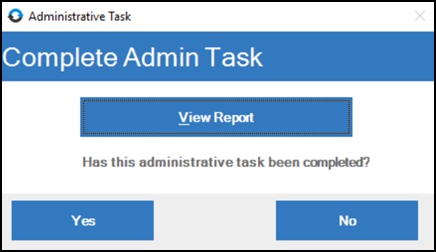
-
A pop-up window will open, loading the criteria for the report. In the dropdown for Apply Criteria Values in the upper left, select PAYROLL PRE-BATCHING.
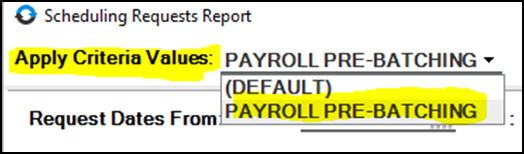
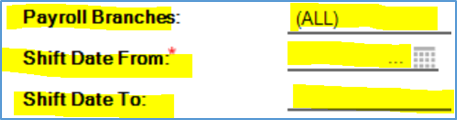
- The criteria will load. Update the criteria in the three highlighted fields:
- Payroll Branches: Select your home branch.
- Shift Date From: This date should be the week beginning date for the week prior to the week you are in.
-
Shift Date To: This date should be the week ending date for the week prior to the week you are in.
- Review the report. Identify and resolve any problems, as laid out in this section below.
- Coordinate and communicate with clinicians, Clinical Supervisors, Staffing Manager, contract staff, and/or other workers as needed.
- Keep worker’s supervisors informed of any trends or errors made by their direct reports so that they are able to help educate and prevent future errors.
- Contractual workers: Some items are not impactful for contractual staff and can be disregarded, but follow-up will still be needed on anything that impacts the clinical side (including overlaps). Items that are excluded in needing be addressed for contractual staff only are: missing travel time entries, travel time entered at start/end of day.
-
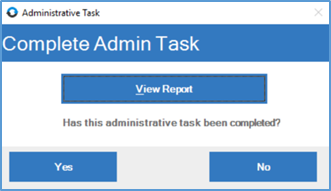
When the report has been reviewed and all issues have been resolved, mark the administrative task as complete by returning to the administrative task window and selecting Yes.
Examples of problems to look out for are listed below:
Warnings (will be in red italics), which include the following:
-
Under 15 Minutes:

-
Overlapping Times:

In this example, the overlap is between documentation time in-home visit time. -
Exceeding visit thresholds:

-
The “Unaccounted Time” warning may be disregarded; this merely indicates that there was a gap of time not worked within the employee’s day.

Paused Visits, identifiable by visit times appearing on separate lines as back-to-back time entries for the same client and same service code.

- Professional Staff: If gap in time is greater than 10 minutes, follow up with the clinician to identify whether this was intentional. Correct visit times if needed.
- Paraprofessional Staff: Pauses within visits for paraprofessional staff directly affect their hourly pay. If there is a gap between time entries for the same client greater than one minute, ensure that any appropriate corrections are made to the visit time to ensure accurate pay. Also ensure this is addressed with the paraprofessional staff to prevent future errors.
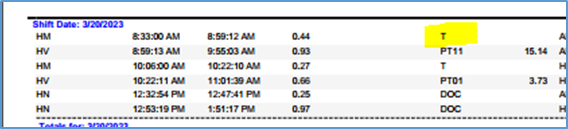
Travel Time at Start/End of Day, which must be removed.
-
Example of travel entered for first visit of the day, which must be removed:
-
Example of first visit with no travel time (correct):

NOTE: if a worker is completing visits for clients at multiple branches, this must be taken into account. The visits for different branches will appear on separate pages at the beginning and end of the report since it is sorted by branch location.
Missing Travel Time
- Visits with less than two hours between them should have travel time between the visits, and for hourly paraprofessional staff missing travel time will directly affect their hourly pay.

Documentation Time for Paraprofessional Staff
- HHA’s and HMK’s should not have documentation time. Follow up to correct visit times while ensuring employee is paid for any time worked. Identify what occurred and educate staff to prevent future errors.
📅 Effective: 08.21.2025 | 🛠️ Revised: 05.14.2026 | ✅ Approved: JFJ