
O-14-304 Non-Visit Activity Console - Review and Approve - Decline
This process is completed as part of the larger overarching process O-11-104 Weekly Payroll Pre-Batching, which you should reference to ensure this process is completed at the correct time in sequence with other related processes.
👤 RESPONSIBLE POSITION
Business Manager
🎯 PURPOSE
Completing this task addresses entries for time worked which is not captured otherwise by visit time or travel time. It is important that these entries be addressed prior to payroll being processed so that this time is captured and reporting will be accurate.
🔄 PROCESS
-
The task in workflow appears like this.

-
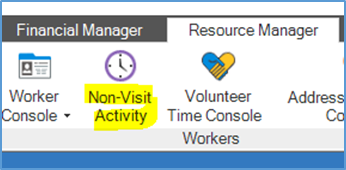
To access the Non-Visit Activity Console, navigate to your HCHB Main screen. Click on the Resource Manager tab and select Non-Visit Activity. The Non-Visit Activity Console will open in a new window.
- Adjust filters on the left-hand side of the console to match the fields described below:
-
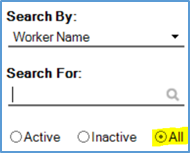
Search for: This field should be empty but beneath it All should be selected.
- Service Line: ALL
- Branch: If you have access to more than one branch, select only your own branch.
- Teams: ALL
- Non-Visit Activity Status: Select only OPEN.
- Non-Visit Activity Type: ALL
- Payroll Transmittal Group: ALL
- From: Enter a start date of 01/01/2001.
- To: Enter the week ending date from the previous week.
- Workers: ALL
- Sales Team: ALL
-
- Select Load. The filters will apply and your list of NVA’s will update.
- The responsibility of reviewing and accepting/declining NVA’s is divided in the following way:
- Business Managers address paraprofessional workers’ NVA’s
- Clinical Supervisors address professional workers’ NVA’s
- Review the list of NVA’s and identify any that have been entered by professional staff. If there are any remaining, follow up with the Clinical Supervisor(s) asking them to address these.
- Address any NVA’s entered for paraprofessional staff.
- Open each item by selecting View, review the data, make any needed corrections, and then Accept or Decline as appropriate.
Specific to paraprofessional Attempted Visit NVA’s:
- Ensure accurate location is entered and that travel time and mileage populated correctly.
- If the paraprofessional staff member is non-salaried and traveled to the client’s home to attempt the visit, they should receive a show-up bonus of $10, which should be entered in Dayforce for the date of the attempted visit. In Dayforce, the comment line should not include PHI but should include a note indicating the reason for the bonus. When approving the NVA, ensure that the bonus is also entered in Dayforce.
- NOTE: salaried aides do not receive the $10 show-up bonus but should have an attempted visit NVA entered for time tracking purposes.
- The NVA for paraprofessionals is entered hourly and the start/end time of the NVA should include both the time the aide spent traveling TO the client’s home and the time spent attempting the visit.
- Exception: if the attempted visit was the first visit of the employee’s day, the travel time to the attempted visit should be excluded.
- Ensure that all NVA’s from this date range have been addressed prior to completing process O-14-309 Employee Payroll Audit Report – Review.
📅 Effective: 08.21.2025 | 🛠️ Revised: 05.14.2026 | ✅ Approved: JFJ