
O-4-204 Verification of Employee Driver's License
PURPOSE: Adara Home Health requires employees to have a current Minnesota driver’s license. Each branch office is responsible for verifying that each new hire employee has a valid driver’s license.
PROCESS:
- Navigate to the Minnesota Department of Public Safety license lookup online services: https://onlineservices.dps.mn.gov/EServices/_/
-
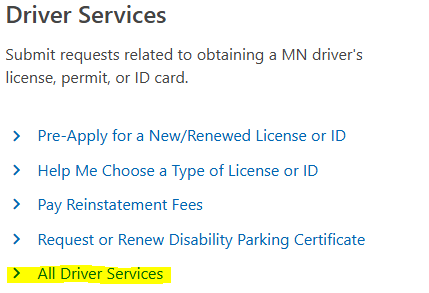
Scroll down to the Driver Services section and select All Driver Services.
-
Scroll down to the Driver Compliance Services section and select Driving Privilege Lookup.

-
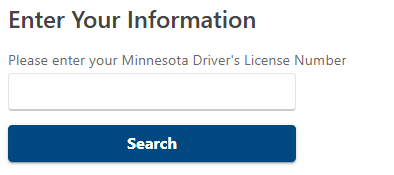
Enter the Driver's License number. Be sure to include all alpha and numeric characters.
- Verify that the driver's license is current and enter the expiration date in the employee electronic record as a renewable requirement so that its expiration can be tracked.
⚠️ NOTE: If any initial or subsequent problems arise related to the license status, the Area Manager must be notified immediately.
- Save a copy of the driver's license in the new hire employment records.
- Upon expiration of the employee’s driver’s license, the license must be re-verified and employee tracking in the employee electronic record must be updated with the new expiration date.
📅 Effective: 04.01.2020 | 🔍 Reviewed: 11.07.2025 | 🛠️ Revised: 11.07.2025 | ✅ Approved by: JFJ