
O-6-403 Award a Bonus
👤 ROLE
Manager
🎯 PURPOSE
In Dayforce, bonuses may be paid to employees in timesheets using a pay adjustment.
This process gives instructions on how to add a bonus pay adjustment to specific employee.
The “On-Call” pay adjustment entered is not reflective of the actual time worked while the employee is on-call, as hourly time worked will be submitted and authorized separately as time punches within timesheets. Rather, the pay adjustment is a flat reimbursement compensating the employee for being on call and available to work if needed.
🔄 PROCESS
-
Logged in as a manager, navigate to Timesheets.

Employees’ timesheets listed will default to your own team, except for Area Managers, for whom employee timesheets will default to include all branch employees.
- Within Timesheets, select a day within the employee’s week. If the bonus is associated to work on a specific date, select that date. Otherwise the bonus may be placed on Saturday of that week.
-
On that date, select the arrow beside the icon shown and choose Add New Pay Adjustments from the dropdown.
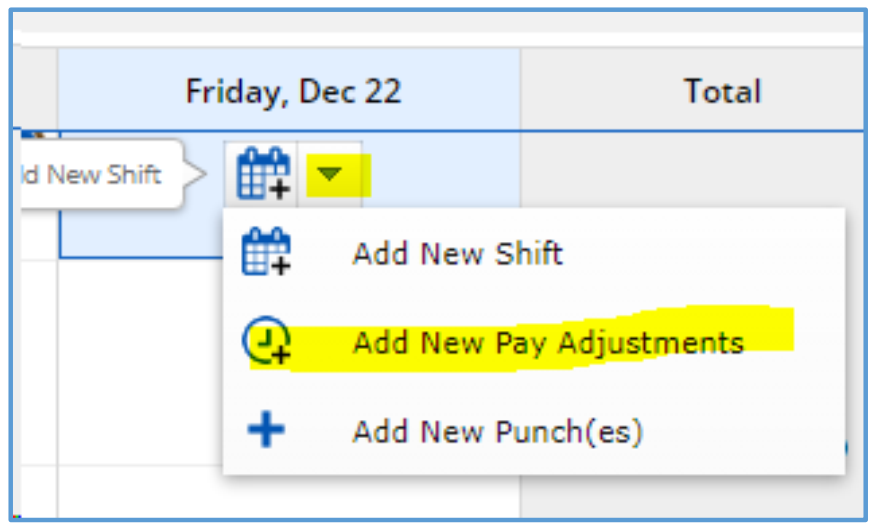
- A pop-up will open. Complete the following field entries:
- Select the pay adjustment type Bonus Pay.
- Enter the dollar amount the employee should be compensated for the bonus.
- Enter the reason for the bonus in the comment field.
-
Select OK.

-
Select the pay adjustment on the calendar and select Authorize to complete manager authorization of the time adjustment.

-
Click Save to save the pay adjustment entry.

📅 Effective: 08.26.2025 | 🛠️ Revised: 08.17.2026 | ✅ Approved: JFJ